






搜索到1篇与Typechos,技术展示的结果
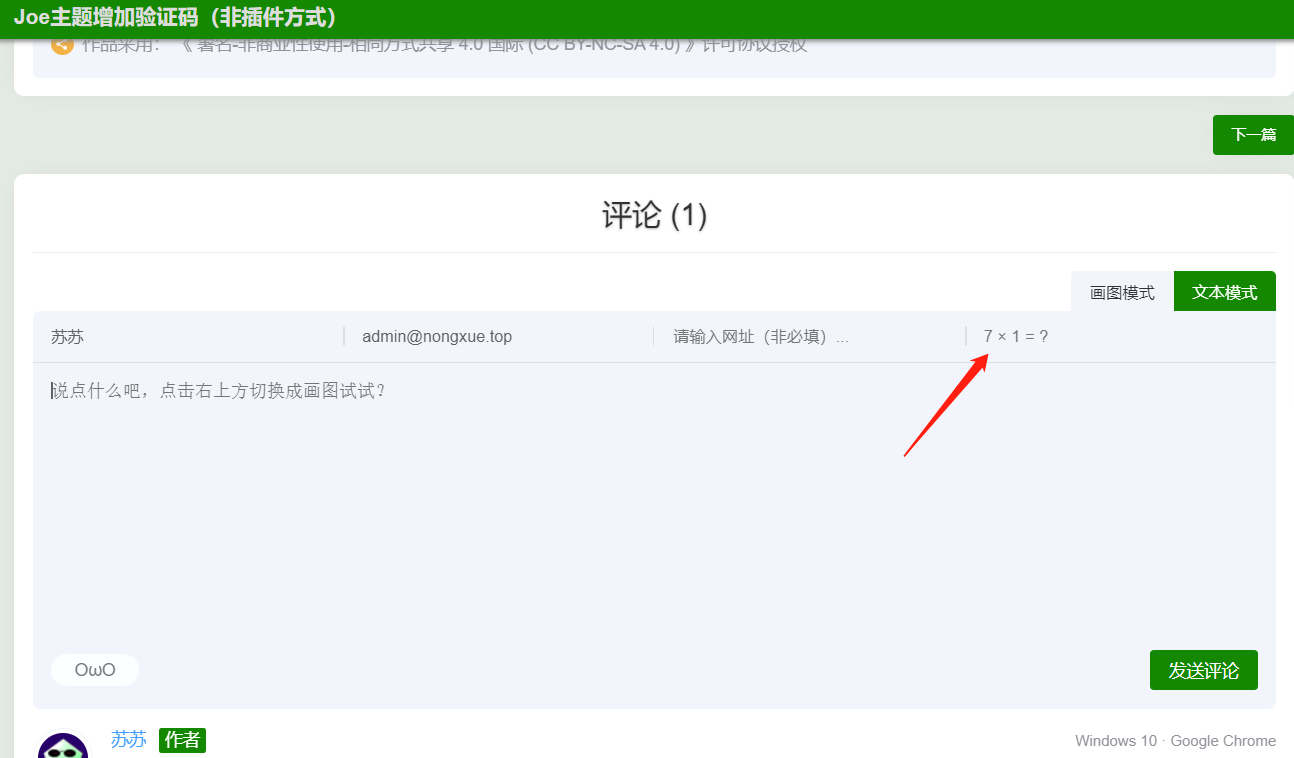
 【转载】Joe主题评论增加验证码(非插件方式) 发现Joe本身不支持评论验证码,就查阅资料,修改部分Joe主题文件,增加评论验证码。当前版本Typecho:1.2.0Joe主题:7.3.6目标非插件方式,简单实现评论验证码,防止机器人灌水。涉及文件/Joe/core/function.php (必须)目的: 增加需要用到的函数增加如下3个函数#生成验证码 function comment_protection_code(){ $num1=rand(1,9); $num2=rand(1,9); $rand=rand(1,100)%3; switch($rand){ case 0: $ret=$num1 + $num2; $symbol='+'; break; case 1: $ret=$num1 - $num2; $symbol='-'; break; case 2: $ret=$num1 * $num2; $symbol='×'; break; } $_SESSION['verify']=$ret; $_SESSION['verify_md5']=md5($num1.$num2); echo "<input type=\"text\" autocomplete=\"off\" name=\"sum\" placeholder=\"$num1 $symbol $num2 = ?\" />"; echo "<input type=\"hidden\" name=\"num1\" value=\"$num1\">\n"; echo "<input type=\"hidden\" name=\"num2\" value=\"$num2\">"; } #验证 function comment_protection_do($comment, $post, $result){ if(md5($_SESSION['verify']) != md5($_POST['sum']) || $_SESSION['verify_md5'] != md5($_POST['num1'].$_POST['num2'])){ throw new Typecho_Widget_Exception(_t('对不起: 验证码错误,请重试。','评论失败'), 200); } return $comment; } #判断路由用到 function endsWith($haystack, $needle){ return $needle === '' || substr_compare($haystack, $needle, -strlen($needle)) === 0; }/Joe/core/core.php (必须)目的: 挂载验证函数搜索函数 themeInit ,将如下代码粘贴到函数内#仅在提交评论时生效 if(endsWith($self->request->getPathInfo(), '/comment')){ $comment = comment_protection_do($comment, $post, $result); }/Joe/public/comment.php (必须)目的: 增加验证码输入框搜索 输入网址 ,在它的下方增加一个兄弟节点,用来输入验证码... <div class="list"> <input type="text" autocomplete="off" name="url" placeholder="请输入网址(非必填)..." /> </div> #上方为原始代码 #下方为新增 <!-- 增加验证码输入框--> <div class="list"> <?php comment_protection_code();?> </div>/Joe/assets/js/joe.global.js (必须)目的: 在提交评论时,增加验证码校验参数打开未压缩版js文件,搜索 激活评论提交 ,用下方代码替换,然后压缩后替换同文件夹的joe.global.min.js /* 激活评论提交 已修改 */ { if ($('.joe_comment').length) { let isSubmit = false; $('.joe_comment__respond-form').on('submit', function (e) { e.preventDefault(); const action = $('.joe_comment__respond-form').attr('action') + '?time=' + +new Date(); const type = $('.joe_comment__respond-form').attr('data-type'); const parent = $('.joe_comment__respond-form').attr('data-coid'); const author = $(".joe_comment__respond-form .head input[name='author']").val(); const _ = $(".joe_comment__respond-form input[name='_']").val(); const mail = $(".joe_comment__respond-form .head input[name='mail']").val(); const url = $(".joe_comment__respond-form .head input[name='url']").val(); const sum = $(".joe_comment__respond-form .head input[name='sum']").val(); const num1 = $(".joe_comment__respond-form .head input[name='num1']").val(); const num2 = $(".joe_comment__respond-form .head input[name='num2']").val(); let text = $(".joe_comment__respond-form .body textarea[name='text']").val(); if (sum === '') return Qmsg.info('请输入验证信息!'); if (author.trim() === '') return Qmsg.info('请输入昵称!'); if (!/\w+([-+.]\w+)*@\w+([-.]\w+)*\.\w+([-.]\w+)*/.test(mail)) return Qmsg.info('请输入正确的邮箱!'); if (type === 'text' && text.trim() === '') return Qmsg.info('请输入评论内容!'); if (type === 'draw') { const txt = $('#joe_comment_draw')[0].toDataURL('image/webp', 0.1); text = '{!{' + txt + '}!} '; } if (isSubmit) return; isSubmit = true; $('.joe_comment__respond-form .foot .submit button').html('发送中...'); $.ajax({ url: action, type: 'POST', data: { author, mail, text, parent, url, num1, num2, sum, _ }, dataType: 'text', success(res) { let arr = [], str = ''; arr = $(res).contents(); Array.from(arr).forEach(_ =### { if (_.parentNode.className === 'container') str = _; }); if (!/Joe/.test(res)) { Qmsg.warning(str.textContent.trim() || ''); isSubmit = false; $('.joe_comment__respond-form .foot .submit button').html('发表评论'); } else { window.location.reload(); } }, error(res) { isSubmit = false; $('.joe_comment__respond-form .foot .submit button').html('发表评论'); Qmsg.warning('发送失败!请刷新重试!'); } }); }); } }自定义css(可选) 目的: 在输入框左侧增加竖形分割线,统一外观添加方式:后台->Joe主题设置->全局设置->自定义CSS,增加如下样式/*验证码处css*/ @media (min-width: 768px){.joe_comment__respond-form .head .list:nth-child(4){position:relative}.joe_comment__respond-form .head .list:nth-child(4)::before{content:'';position:absolute;top:50%;transform:translateY(-50%);width:1px;height:15px;background:var(--classA)}.joe_comment__respond-form .head .list:nth-child(4)::before{left:0}}截图展示{tabs}{tabs-pane label="验证码位置"}{/tabs-pane}{tabs-pane label="未输入提示"}{/tabs-pane}{tabs-pane label="输入错误提示"}{/tabs-pane}{/tabs}转载说明原文地址